Numbers (main keyboard and numpad): Use the number keys on the main keyboard and number pad to insert a number in to the currently selected cell. If pencil mode is activated, a pencil mark will be inserted in to the current cell instead.
Arrow keys: Move the currently selected cell up/down/left/right.
Ctrl/Shift/Alt with number: Use the Ctrl/Shift/Alt keys with a number key to insert a pencil mark in to the currently selected cell. If pencil mode is activated, using Ctrl/Shift/Alt keys with a number key will insert that value in to the current cell (not a pencil mark).
Delete/Backspace: If there is a value inserted in the currently selected cell, the value will be removed. If there is pencil marks inserted in the currently selected cell, the pencil marks will be removed.
- and =: These keys (and most of the other symbol keys on a keyboard) will activate/deactivate pencil mode.
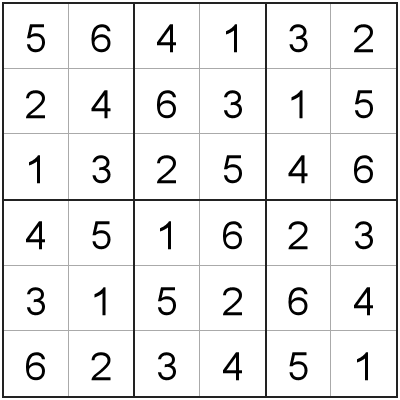
A Kids Sudoku puzzle is very similar to a standard Sudoku puzzle, but it is smaller.
This example puzzle is 6×6, so you need to fill each row, column and 2×3 region with the numbers 1-6
once and only once.
Some Kids Sudoku puzzles are 4×4, these puzzles will use the numbers 1-4.
 Download image

 Kids Sudoku leaderboard
 How to play